




Game: Deskworm
Genre: Casual, Indie, Simulation
System: Steam (Windows)
Developer | Publisher: Kinychanchan
Controller Support: Partially Compatible
Price: US $Free| UK £Free| EU € Free
Release Date: January 15th 2026
A review code was provided, many thanks to Kinychanchan.
A Companion for Your Desktop
Deskworm is a tiny worm that keeps you company while you work on your PC. It’s a gamified companion you can customize, track your time with, and remind you to stretch and drink water — all while roaming across your screen as you click or type. If you’d rather not have a little creature wandering around while you work, you can tuck it away in a “pocket,” where you can also adjust some settings. Deskworm isn’t a game — it’s a partner for your daily on-screen life.
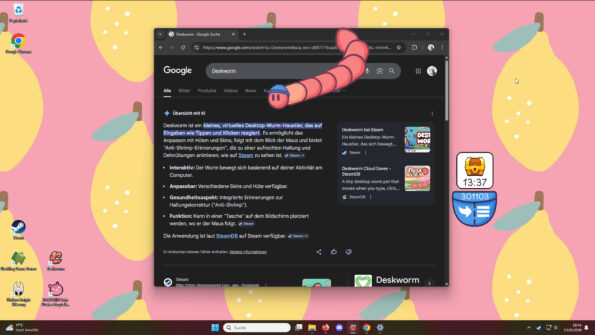
A Customized Experience
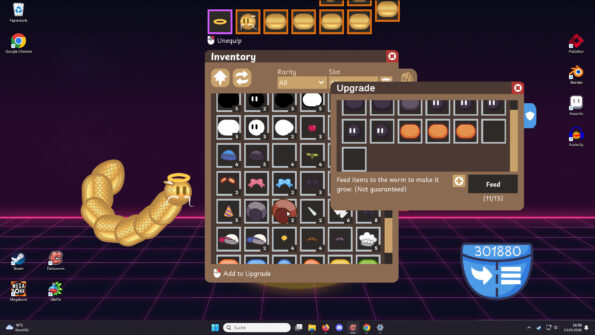
What Deskworm does best is offer a huge range of customization options. Starting with the worm itself: you can dress it however you like, with items for each slot — body, tail, head, and hat. These items can be purchased on the Steam Store, but they can also be earned just by playing, with new items appearing from time to time for you to redeem. You can also use items to grow your worm or craft new ones with higher rarity.
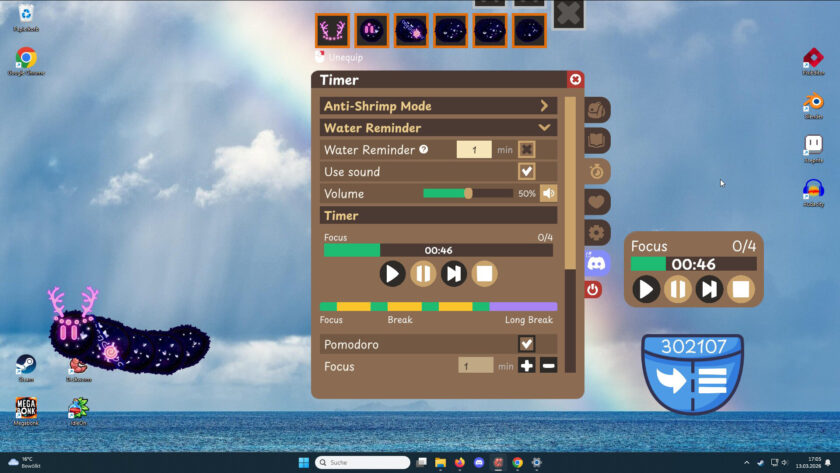
You can set up some timers to remind you to stretch, drink water, or do a third custom activity. For each timer, you can modify the duration, decide whether it plays a sound, and adjust the volume. A fully customizable Pomodoro timer is also available for those who like using that method to stay focused.
In the options menu, you’ll find even more configurations to fine-tune your experience. Most importantly, you can use Deskworm on any screen you like — great for multi-monitor setups. You can also define a custom area for your worm to wander if you don’t want it roaming everywhere. Plus, you can toggle fun sounds for typing and for when a new item is ready to be redeemed.

The Experience
I’m not someone who typically uses desktop pets, but I do often have a clicker or another game running in the background. I genuinely enjoyed having a little companion with me, and although I’m writing about Deskworm as if it’s a game, I want to emphasize that it’s mostly a tool rather than just a game. The sheer number of customizable features makes me believe Deskworm could be very helpful for people who want and need such tools.

Ironically, I’m the kind of person who needs constant reminders to drink water but is also very good at ignoring alarms. That said, I did manage to drink more water with the help of my little worm. I haven’t yet adapted to the Pomodoro timer, but I believe that if I ever want to use it, my worm will help me again.
I spent a good amount of time customizing my worm, testing new cosmetics, and changing the color of every body part to make it prettier — even spending some items to feed my worm and make it grow, just so I could have more parts to customize.
Conclusion
As a free-to-play experience, I see no reason not to try Deskworm. Although it’s not a game, it’s an interesting tool if you want the best blend of a tool and a game. I had fun, drank more water, and collected a nice number of wearables for my worm — all while doing other things on my computer. With so many ways to tailor the experience, I think this title is a perfect fit for a lot of people. Whether you’re looking for a companion or already use timers, you should definitely give Deskworm a try.
Final Verdict: I Like it a Lot: 
Do you like our content?
Subscribe to our daily news and never miss a review!