


Game: Hexograph
Genre: Casual, Indie, Strategy
System: Steam (Windows)
Developer|Publisher: Icospheric
Controller Support: Yes
Steam Deck: Unknown
Price: US $9.99 | UK £8.19 | EU € 9,69
Release date: November 10, 2026
Review code used, with many thanks to Icospheric
Too Hex to Be Square
There’s a plethora of nomogram puzzle games out there, each with its own take on the basic gameplay mechanics to add variety and enjoyment and to distinguish it from others. But for the most part, they have one thing in common: a grid composed of squares, with the numbered clues appearing in horizontal and vertical rows.
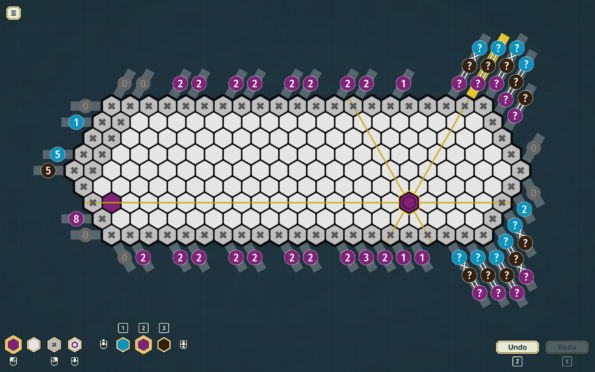
Hexograph, however, as the name of the game implies, shakes things up by replacing the squares with hexagons and placing the numbered clues along three axes instead of two. And if this wasn’t enough, the game also includes some other unique mechanics to add to the challenge, as well as a variety of settings to adjust the difficulty and your gaming experience.
Open a Chapter to a New Challenge
Hexograph consists of 200 puzzles divided into four chapters, with each chapter introducing one or two new gameplay mechanics to ramp up the challenge; you need to solve 10 puzzles in each chapter before the next one will unlock.
Chapter 1 starts off simple to get you used to the new overall setup, using basic nonogram rules and one color to fill the cells. Chapter 2 introduces multiple colors, with each puzzle consisting of two to four different colors. The numbered clues are colored to match the corresponding color for filling the cells.
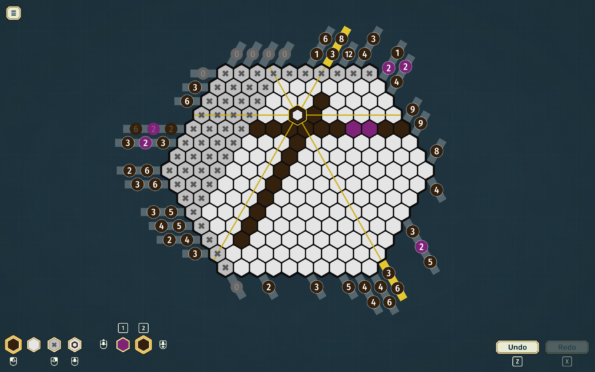
Chapter 3 really mixes things up by introducing question marks as clues instead of numbers. Puzzles in this chapter range from one color to multiple colors and mix numbered clues with question mark clues.
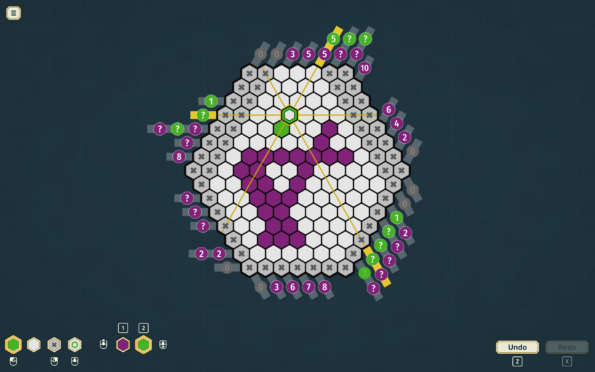
But it’s Chapter 4 that introduces what I found to be the two most unique mechanics: parallel lines connecting question mark clues, indicating that each connected group consists of the same number of filled cells, and diagonal lines connecting question mark clues, indicating that each connected group consists of a different number of filled cells.
As in Chapter 3, puzzles range from one to four colors and mix numbered clues with question mark clues, as well as connected and unconnected question mark clues. I found this chapter especially challenging, sometimes confusing the two different types of connectors and sometimes getting so used to seeing the question mark clues that I almost didn’t recognize the clues that were actual numbers.
Making Your Mark
Hexograph is playable with either mouse, keyboard, or controller. I mainly played with keyboard and touchpad; when using a controller, I found the cursor difficult to control even after making in-game adjustments. Your options for marking cells include placing a solid color, a blank cell, an x to mark an empty cell, or a color-outlined “maybe” cell. I didn’t find a use for the “maybe” marker, though perhaps more strategic players might. I also didn’t understand the difference between the blank cell and the x’d cells, and there aren’t any in-game instructions that explain this.
In the settings menus, there are various options for customizing your gameplay, such as changing the four-color palette, changing keyboard/mouse/controller bindings, and turning on and off feedback such as highlighting solvable rows, highlighting rows with errors, and auto-filling empty cells in completed rows, among others. I personally found the feature highlighting solvable rows to be confusing, as this didn’t always mean that the entire row was solvable, only that certain cells in the row were. I also often found that it would highlight a row in which none of the cells seemed to be solvable, as far as I could determine, and so I would sometimes end up guessing instead.
Another option I found quirky was auto-filling empty cells in completed rows. Sometimes the game wouldn’t count the row as solved until you actually placed an x in each of the empty cells, rather than auto-filling them for you. This feature did work most of the time, which made it even more confusing in those instances when it did not. This wasn’t a big deal in the easier levels, but in the larger and more difficult puzzles in Chapter 4, this could often become very frustrating. I admit this might just be a me problem, however.
Thankfully, the game does auto-save your progress whenever you quit, and the next time you play you have the option of either resuming where you left off or restarting the whole puzzle.
Overall Gaming Environment
To help create an atmosphere conducive to focusing on solving the puzzles, Hexograph includes six chill instrumental background tracks, as well as a minimalist interface and simple sound effects. Though simple, the gameplay sound effects were quite satisfying. The volume of the music and game effects are adjustable, though there isn’t an option for turning either off entirely.
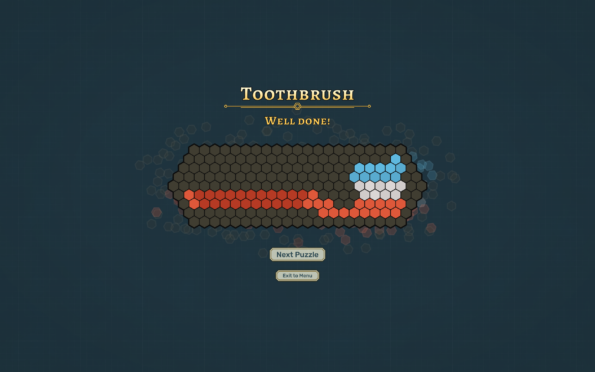
Each puzzle can have up to 4 colors, and the settings menu allows you to pick one of four palettes, including sepia. No matter what colors you use to fill the cells, however, once you have completed the puzzle, the colors will change to match the finished picture. Completing the puzzle also earns you a cheerful “Well done!” message and triumphant sound effect, amid a scattering of hexagon confetti.
While Hexograph does provide plenty of options for adjusting settings to match your gameplay, and some accessibility features, there are a couple of features that I think would have been helpful, especially for those newer to nonogram puzzles. One would be to have an explanation of the various mechanics as a main menu item, instead of only appearing on the screen of the first puzzle in the chapter. The other would be to give the player the option of requesting a limited number of hints, particularly in the more challenging puzzles. I think this would help address the possible frustration factor at higher levels in the game.
Conclusion
Overall, I found Hexograph to be very enjoyable, especially with the unique gameplay allowed by having hexagon-shaped cells instead of the usual squares and clues appearing along three axes instead of two. The minimalist interface, chill BGM, and ability to save your progress allow you to focus on solving the puzzles at your own pace, without feeling pressured or rushed, and the customization options allow you to tailor your gameplay experience more to your liking. A few tweaks, like having the option to ask for hints or more consistency in gameplay settings such as the one for auto-filling empty rows, could help keep things from getting too frustrating in the more difficult puzzles.
With 200 puzzles and the unique gameplay mechanics, I think a game like Hexograph would keep any nonogram or puzzle game fan happily occupied for a good while and provide a generous amount of content for the price. The solved images are very cute and always brought a smile to my face when the finished version would float up.
Hexograph includes 20 Steam achievements, six of which are hidden. Five of these achievements were added in a recent patch, which also makes me hopeful there might be DLC in the future, adding more puzzles.
Final verdict: I Like It a lot

Do you like our content?
Subscribe to our daily news and never miss a review!