




Game: Nonoko: Lofi Days
Genre: Productivity App, Clicker
System: Steam (Windows)
Developer | Publisher: NonokoMimiko | GongHey
Controller Support: None
Price: US $4.99 | UK £3.99 | EU € 3,99
Release Date: September 1st, 2026
Review code provided, with many thanks to NonokoMimiko.
Need a cozy companion with soft music for your study or work sessions? Nonoko: Lofi Days might just be what you’re looking for!
Make Productivity Cozy
I have been searching for a productivity app with lofi music included, as I am always listening to a playlist in the background while I tackle all my to-do lists. And surprisingly, Nonoko: Lofi Days is what I have been looking for in a productivity app.
In essence, Nonoko: Lofi Days is a cozy, lightweight desktop lo-fi companion and productivity app that brings original soft music, ambient sounds, and focus tools to your work and study spaces.
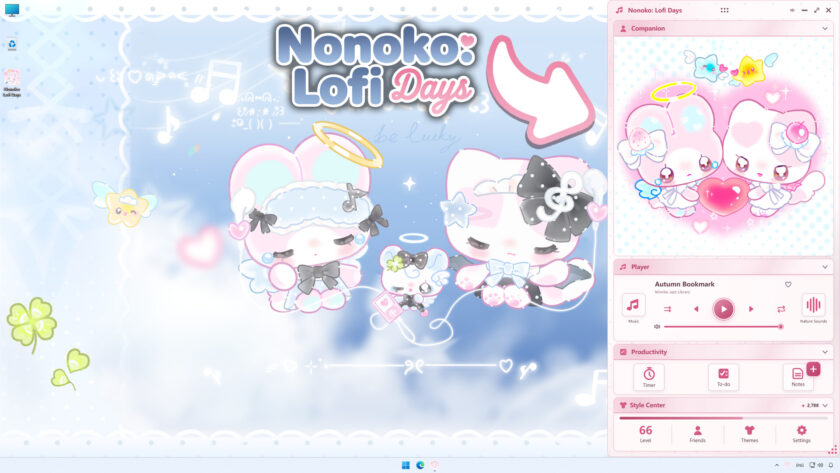
How To use Nonoko: Lofi Days
This productivity app has 4 main sections: the main hub, a note-taking tab, a timer, and a to-do list section.
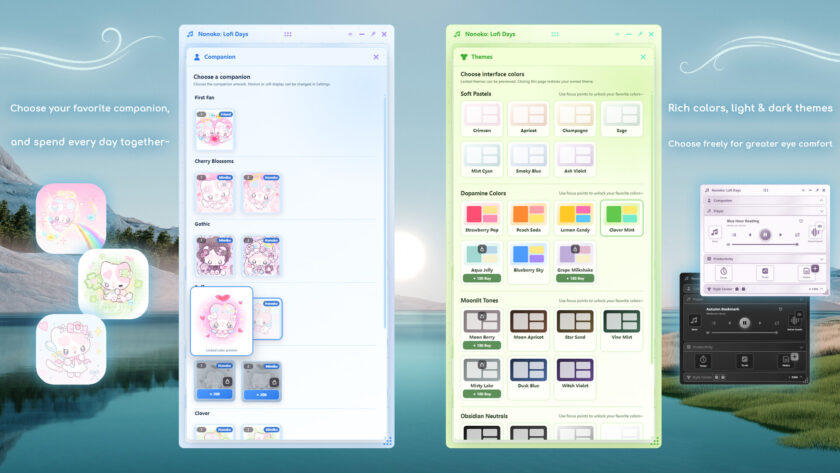
Starting with the main hub, in this tab you can change the theme color of the app, music, ambient sounds, your companion scene, and other settings that will make it more personalized, such as window size, alert sounds, language, and more. You can even arrange the order of each section on this tab and have cute friends with you as you work, though most of the time I have the companion tab closed, as the colors and animation distract me from my tasks.
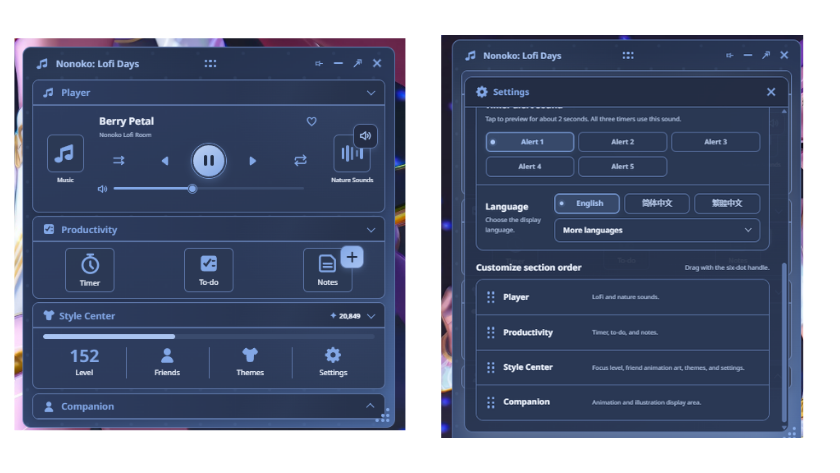
Both the note-taking section and the to-do lists of Nonoko: Lofi Days are lifesavers when working on the computer. Sometimes I get ideas for a project while working on something else, and I need to write them down in a specific place so they won’t get lost. For this, I quickly open the note tab, input the title and the idea I got, and then close it.
As for the to-do lists, you can create different groups and add the corresponding tasks to each group, keeping your task list organized. This is of huge help when having to get different assignments done. I’ve also been using it to write down specific personal tasks that I need to remember throughout the day.
All your notes and to-do lists are saved automatically and will be loaded the next time you open the app. Something to have in mind is that the to-do list section is quite simple. It is meant to be for short sentences or descriptions for each task. This is quite useful, as it also helps me be more intentional and direct with my to-dos, and not overwhelm myself with a task the size of a paragraph.
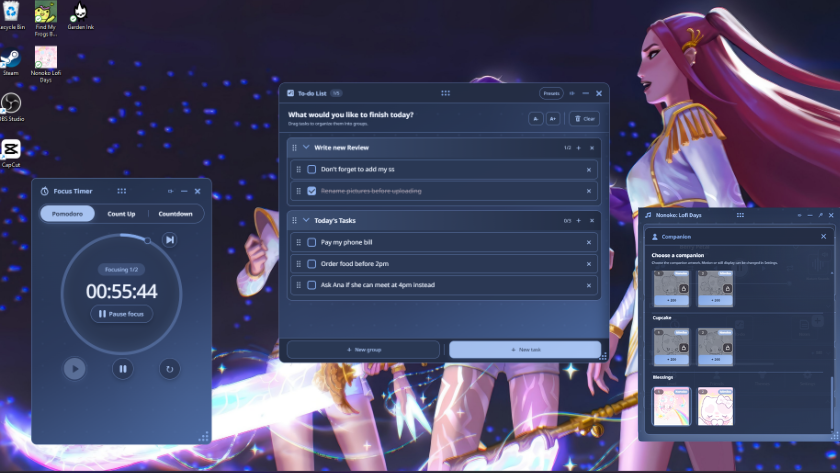
Next up is the timer, in which you can set up a classic Pomodoro timer, count-up timer, and even a countdown timer. These have been useful for tracking the real time I take to complete some chores.
What I love about the timer in Nonoko: Lofi Days is that you can set your own Pomodoro time. I set mine to 2 segments of 1 hour with a break of 10 mins in between, as shorter sets of 25 or even 30 minutes don’t really work for me. You’re also able to change the duration of the breaks and the number of rounds you want it to repeat.
Each section supports free resizing, always-on-top mode, and position memory, which come in handy when creating your preferred working station without interference.
Music in Nonoko: Lofi Days
As the name of the app says, Nonoko: Lofi Days indeed offers a playlist with lofi-type music. As of now, there are 2 main playlists with original tracks: one with lo-fi music and the other with library jazz mood songs. The latter made me feel like I was in a cozy cafe, and it was the perfect playlist for me to concentrate on my tasks. The developer of Nonoko: Lofi Days is updating it constantly, so we can expect more music in the future!
Talking about updates, a few days ago the developers added the option to listen to your own music. If you have the MP3 files of your favorite songs, you can create a custom playlist combining them with the ambient sounds included in the app.
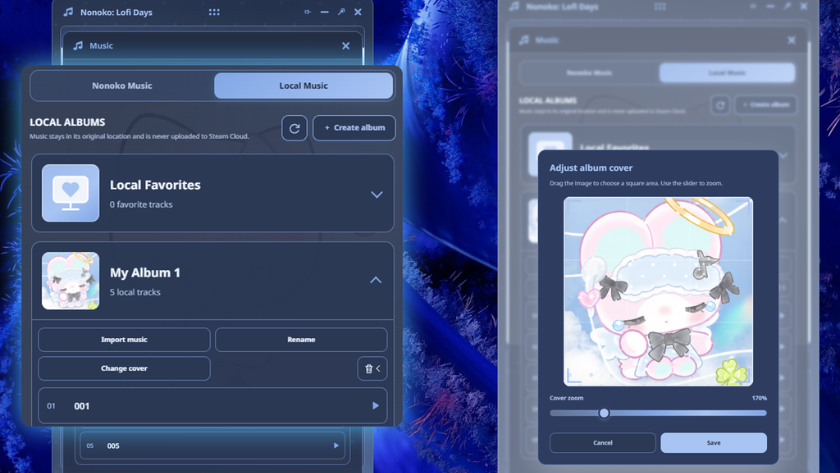
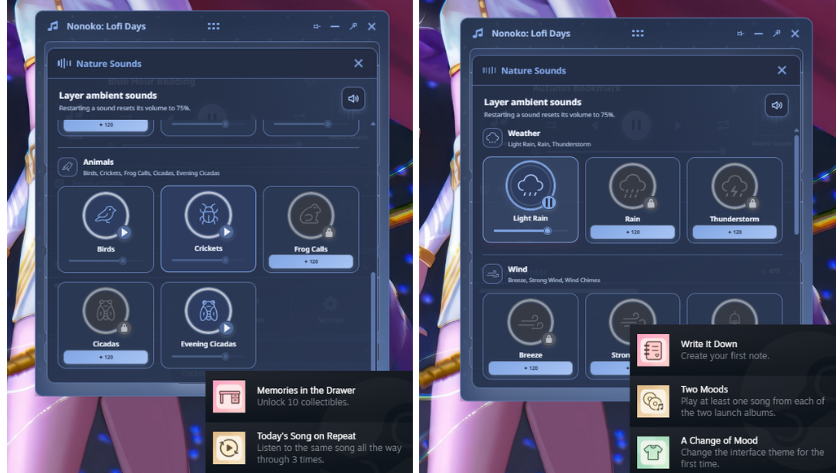
My favorite feature is indeed the ambient sounds of Nonoko: Lofi Days. They are all real natural sounds from the mountains, water streams, and other locations recorded by the developer team! There are up to 14 sounds, some of which are rain, wind, birds, crickets, and frogs. What I love about this is that you can create your own combinations; you can choose to activate water sounds + wind + frogs and lo-fi music in the background. If it’s too much noise for you to properly concentrate, you can either lower the volume or activate one ambient sound at a time.
Personalizing Your Productivity Space
Nonoko: Lofi Days has some gamification in it. Every time you are working with the app open, you automatically gain experience points and level up. With your experience points, you can unlock different companions, themes, and ambient music. Thankfully, there are dark mode themes available, which I mostly use with all my apps.
As a side note, all the music and nature sounds in Nonoko: Lofi Days can be freely used in live streams—a definite bonus for streamers on YouTube and other platforms looking for relaxing background music.
Conclusion
I have been looking for a productivity app for some time now, but none actually worked for me, as some don’t include music or the tracks they offer aren’t to my liking. Nonoko: Lofi Days tracks and ambient sounds helped me focus for long hours of work, since their music reminded me a bit of the Final Fantasy game soundtracks I love to listen to, and made me feel like a cozy girl with her hot drink in an aesthetic cafe. And to be honest, I’m even considering using their tracks in my future streams!
It’s also a huge perk to have all these productivity tools in one single place. With its lovely music, nature sounds, the variety of themes, and the freedom to set up your space, it surely is a great companion and productivity app to work with.
If you are curious to try apps like this one, I’d recommend you try Nonoko: Lofi Days. I’d love to hear about your experience with it!
Final Verdict: Two Thumbs Up

Do you like our content?
Subscribe to our daily news and never miss a review!