
Game: Guess the Word
System: Nintendo Switch
Developer/Publisher: Ultimate Games
Price: $1.89| £1.19| €1,29
Age Rating: EU 3+/ USA E
Release Date: 14th February 2019
Review code kindly provided by Ultimate Games
Being a father of 6 children, 3 of which are 7 and under, I’m always interested in games designed for toddlers and young children. Guess the Word from Ultimate Games is one such title, so I’m going to take a look. With the targeted audience of course.
The basic premise

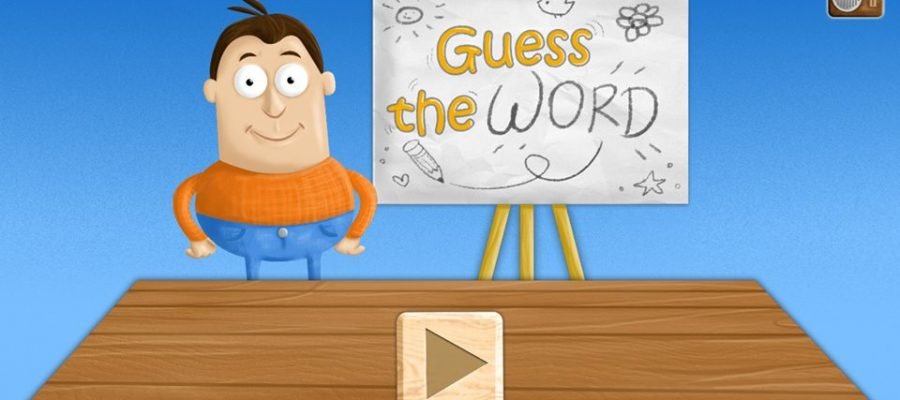
Guess the Word is a straightforward game that features a board, a character called the teacher, and a table. The teacher gradually draws an image on the board, letters are scattered over the table, and children must select and order the letters correctly to spell the correct word. There’s also a timer in the top left which incentivises children to guess the word within the time limit. One play session consists of 10 pictures, some letters, and concludes with an overall grade out of 3 stars.
Very limited
Guess the word is limited in terms of content. It offers little variation, and older children may quickly become bored. There’s also little variety in terms of words. At times, the same word appears more than once during a game, sometimes one after another. I know repetition is great for learning, but a more extensive vocabulary would add more to the game’s overall value.
Sadly, the teacher also lacks personality. His role involves nothing more than holding a pencil and uttering a few choice words like yeah, great, and congratulations. It’d be nice if the teacher could interact with children a lot more.

Enough of Adult Speak
Guess the Word wasn’t designed for grumpy adults like me. Children love simplicity and Guess the Word achieves that. My three-year-old son attention was instantly grabbed by the child-friendly music. Upon recognising each image, he was eager to try and spell the correct word. Thankfully, the developers have designed Guess the Word to assist children by causing letter shaped silhouettes to appear in the available letter tray. This enables children to match letters with letter shapes and enjoy relative success by themselves. Also, letters lock to the letter tray if they’re dragged to the correct spot.
Touchscreen issues and lack of TV mode
Despite the quality of the Switch’s touchscreen, Guess the Word suffers from sensitivity issues. My son, as well as myself, had problems trying to select and move letters smoothly because the game doesn’t always respond to touch. Players are required to touch and drag objects quite hard which are a problem for smaller fingers. Also, a lack of TV mode means families with multiple children can’t enjoy playing together in a communal setting.
My Wife and Sister-in-Law Intervene

My wife has highlighted a problem due to the game’s use of higher case letters. Every letter within the game is higher-case, but children don’t learn to read using higher-case letters. Children are taught to sound out words using lower-case letters. Some spellings are also American which causes an issue for European/British children.
My sister in law found the following information from phonicshero.com:
“Upper case letters have minimal connection to early literacy skills; 95% of written text is in lower case letters. When children’s parents read books to them or when they attempt to read for themselves, children will not typically see text written in upper case. Visual recognition of lower case letters will be more helpful than that of upper case.”
Overall
Due to its low price, Guess the Word is what it is, and that’s fine. As a parent though, I can’t help but think that its developers have cut a lot of corners. Touchscreen controls need extra work and British localisation would be a major plus. So although the price is nice, and my 3 year old had fun with the game, I will give it an I’m not sure.
